How to Verify Contributor Access and Vet Guest Posting Sites

Guest posting gets messy fast when you skip the boring part at the start.
You find a site that looks promising, send a pitch, get a yes, and then discover one of three things: you are not getting a real author byline, the site wants you to upload content into a sketchy system, or the blog is basically a link marketplace wearing a content marketing costume.
If you want guest posting to help with visibility, referrals, brand trust, and links that actually make sense, you need two filters before you ever write a draft:
- Can I clearly verify what kind of contributor access I’m getting?
- Is this site worth being associated with in the first place?
This is the first step in learning how to get guest posts on high DR websites that provide real authority. That is the difference between a useful placement and a wasted week.
TL;DR
- The "Admin" Trap: Avoid sites where guest posts are published under a generic "Admin" account. This signals a lack of editorial care and often results in your link being stripped or devalued.
- AI/Stock Persona Detection: Reverse-image search author headshots. If the "expert" appears on hundreds of unrelated sites with different names, it's a fake persona used by a link farm.
- Backend vs. Front-end: Understand the difference between WordPress Contributor (can save drafts) and Author (can publish) roles. Never accept publish permissions unless you're a long-term partner.
- Niche Quality Score: Use Rankchase's Free Website Analyzer to verify if a site's traffic comes from relevant keywords or random "junk" terms, ensuring your guest post sits in a high-quality neighborhood.
- Verified Partners: To avoid vetting headaches, use Rankchase to connect with pre-vetted guest post partners who offer transparent contributor bylines and real editorial review.
- "No-follow by Default" Check: Inspect recent guest posts on a target site (
Right-click>Inspect). If links haverel="nofollow", adjust your expectations for SEO authority vs. brand awareness.
Why Confirming Your Contributor Status Matters
Contributor access is not a minor admin detail. It changes what you control, what the editor controls, and what kind of risk you are taking on.
If you misunderstand your access level, you can end up writing for a site where your piece gets published under “Admin,” your bio never appears, your links are silently stripped, or your draft sits in a queue nobody checks. I have seen all four happen, and each one usually traces back to the same mistake: the writer assumed “yes, we accept guest posts” meant a normal editorial workflow.
There is also a search quality angle here. Google has been very clear that excessive guest posting done mainly for links can trigger spam concerns, especially when link tagging is handled poorly or the setup looks commercial rather than editorial. Google also recommends using proper link attributes such as rel="sponsored" for paid placements and rel="ugc" for user-generated content where appropriate. That does not mean every guest post is a problem. It means sloppy, scaled, low-trust guest posting is a problem.
So before you pitch, you want to know three things:
- Will your name appear as a real author?
- Will an editor review and publish the content?
- Will the publishing setup make the site look open to abuse?
If the answer to any of those is unclear, do not move forward yet. Ask first.
A simple rule I use is this:
If a site cannot explain how guest content is submitted, reviewed, attributed, and published in two short emails, it is usually not running a serious editorial process.
That one rule saves a lot of time.
Common Types of Guest Post Submission Access
Not every guest posting workflow looks the same. Knowing the model helps you avoid confusion and ask the right questions early.
Full Backend Dashboard Accounts
This is the setup many writers assume they are getting, especially on WordPress sites.
In WordPress, the Contributor role can write and manage its own drafts but cannot publish them. The Author role can publish and manage its own posts. That difference matters a lot when a site says, “We’ll create you an account.” You need to know which one they mean.
A backend account can be fine when the site is legitimate and editorially controlled. It is useful when the editor wants you to upload formatting, images, alt text, and internal links directly. But it also creates friction points:
- some publishers hand out higher permissions than they should
- some forget to remove access later
- some have no review step at all, which often correlates with lower-quality sites
If you are the contributor, ask whether you can only save drafts or whether you can publish. If you are the site owner, you usually want guest writers far away from publish permissions unless they are long-term trusted contributors.
Front-End Content Submission Portals
This is usually the safer middle ground.
Instead of logging into the CMS backend, the writer uses a submission form, a restricted portal, or a workflow tool that passes the draft to editors for review. For site owners, this reduces exposure to plugin settings, theme files, user lists, and other parts of the site that guest authors should never touch.
From the writer side, front-end portals are often cleaner, but you still need to verify what happens after submission. Does the content become a draft? Is there editorial review? Are links reviewed manually? Does the submission form create a public author page or just dump the article into a generic queue?
A front-end portal is only a good sign if there is a real editorial layer behind it.
Email Pitching Without Direct Site Access
A lot of the best guest post opportunities still work this way.
You pitch by email, the editor approves the topic, and you send the draft in a doc. They publish it manually. No account. No portal. No CMS access. For many quality publications, this is normal because they want total control over formatting, compliance, style, and link review.
This method is slower, but it often produces better outcomes because the editor stays involved. You also get a very clear signal of whether the site is selective. If someone accepts any topic instantly and never discusses audience fit, the bar is probably low.
When a site uses email-only submissions, your verification job becomes simple: ask how authors are credited, whether guest contributors receive dedicated bylines, and whether links are reviewed under a standard policy.
How to Verify Contributor Access Levels Before Pitching
This is where most people can tighten their workflow. You do not need a full audit before every outreach email, but you do need a short verification pass.
Reviewing the Official 'Write for Us' Guidelines
Start with the site’s own contributor page if it has one.
You are looking for specifics, not branding language. Good guidelines usually tell you:
- who the audience is
- what topics they accept
- whether they allow guest authors, experts, partners, or customers
- how attribution works
- whether links are restricted
- how the draft is submitted
- whether the editor reserves the right to edit or reject
Bad guidelines are vague and conversion-focused. If the page talks more about “instant publishing,” “do-follow placements,” or “high DA opportunities” than audience and editorial standards, move on.
I also look for contradictions. If the site claims strict editorial review but has multiple thin, generic, keyword-stuffed posts published in the last few weeks, the guidelines are probably decorative.
A fast mini-workflow:
- Open the contributor page.
- Check whether the process is described in a few concrete steps.
- Search the site for recent guest posts.
- Compare the promised process with what is actually being published.
If the page does not exist, that is not automatically a deal-breaker. Plenty of good sites accept external contributions quietly. But then you need stronger verification through the next two checks.
Checking Existing Guest Posts for Dedicated Author Bylines
This is the fastest trust signal on the page.
Search the site for obvious guest post footprints such as guest bios, external contributor pages, expert roundups, or “written by” bylines that differ from the in-house team. You want to see whether external authors are treated like real contributors or like disposable content suppliers.
A proper byline setup usually includes at least one of these:
- a named author profile
- a short contributor bio
- a consistent author archive
- links to the writer’s brand or profile only when contextually appropriate
A weak setup usually looks like this:
- every guest post is authored by “Admin”
- author names appear on-page but do not resolve to a profile
- The "AI/Stock Persona" Trap. Use Google Lens or a reverse image search on the author's headshot. If the same "expert" appears on hundreds of unrelated sites with different names, it's a fake persona used by a link farm.
- the site rotates dozens of unrelated authors with no topical consistency
- all posts include the same style of exact-match commercial links
If you want a quick decision rule, use this one:
This check also helps you find niche-relevant guest post opportunities that align with your brand's expertise. It also helps you spot whether the site is drifting into site reputation abuse territory, where third-party content is published mainly to exploit the host site’s authority rather than serve its audience. Google tightened its public guidance around this area in 2024 and later clarified the policy language again, so this is no longer a theoretical concern.
Clarifying Account Permissions During Email Outreach
This part should be direct and short.
Do not send a long legal-sounding checklist. Just ask the editor a few practical questions before you invest time in the draft.
A message like this works:
Before I put together the draft, can you confirm how contributor publishing works on your side? I’m mainly checking whether posts are submitted by email or through an account, whether guest posts get individual author bylines, and whether all submissions go through editorial review before publishing.
That single paragraph usually tells you a lot from the reply.
If they answer clearly, great.
If they dodge the byline question, avoid the review question, or jump straight to pricing and link count, you have your answer.
I also like to ask one permission-specific question when backend access is involved:
If you create an account, will it be draft-only access or author-level publishing access?
That wording is useful because it signals that you understand the difference.
Evaluating the Quality of Guest Blogging Opportunities
Once contributor access looks legitimate, the next step is deciding whether the site is actually worth the effort.
A clean workflow on a weak site is still a weak opportunity.
Confirming Genuine Organic Traffic Volume
Do not stop at a traffic screenshot.
Third-party SEO tools are useful for directional estimates, but if a publisher is selling access based on traffic claims, ask for something harder to fake. As explained by Google, the best proof is a redacted screenshot from Google Search Console’s Performance report or analytics access to a limited view, because Search Console shows clicks, impressions, and query patterns directly from Google Search data.
You can also perform a quick independent check using our Bulk Domain Checker. It allows you to verify the DR, traffic, and spam score of any site without needing an account. It also provides a Niche Quality Score to help you see if the site's traffic is coming from relevant topics or random, low-quality keywords.
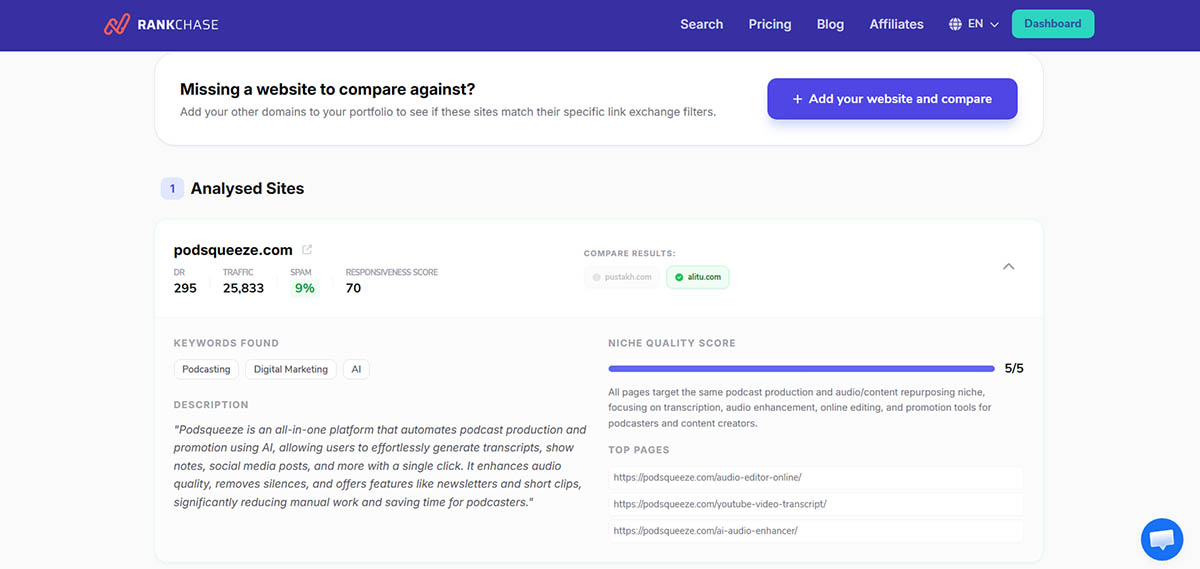
What I look for is not just volume. I want traffic that makes sense. This is how you find guest post sites with real traffic that actually move the needle for your SEO.
For example, a B2B SaaS blog that supposedly gets 80,000 monthly organic visits but most visible pages are off-topic glossary posts about unrelated consumer queries is not a strong guest posting target. You are borrowing a number, not an audience.
Use this simple check:
- Traffic source matches niche: good
- Top pages match audience intent: good
- Recent publishing correlates with search visibility: good
- Traffic is inflated by irrelevant pages, foreign-language mismatch, or obvious trend spikes: bad
Also watch for paid traffic confusion. Ahrefs notes that some tools report paid search estimates separately, and those numbers do not mean the site has real organic reach. If someone waves around a traffic chart, make sure you know which channel you are looking at.
Analyzing the Outbound Link Profile
This is the section most people rush, and it is where the dirtiest sites usually reveal themselves.
Open five to ten recent articles and inspect the external links. You are checking for editorial judgment, not just link count.
Healthy patterns look like this:
- citations to primary sources
- occasional brand mentions that fit the topic
- links placed where a reader would genuinely want more detail
- varied anchor text that sounds natural in the sentence
Unhealthy patterns are easy to spot once you train your eye:
- exact-match money anchors stuffed into unrelated paragraphs
- multiple commercial links in nearly every post
- casino, crypto, payday, pills, essay-writing, or gambling links appearing on a site that has no business covering them
- outbound links that clearly exist for search engines first and readers second
Google’s documentation still draws a bright line around links intended to manipulate ranking signals, and it recommends qualifying paid or sponsored placements appropriately. If a site openly sells followed guest post links, that is not a subtle warning. That is the warning.
One practical heuristic I use:
If I can predict the anchor text before I click the article, the site is probably over-monetized.
You can also use partner discovery tools to narrow the field before manual review. For example, if you are trying to find niche-relevant collaboration opportunities without sifting through a pile of junk domains, Rankchase can help filter sites using relevance, traffic patterns, authority metrics, and spam signals. This is a key part of learning how to scale guest post prospecting effectively. That does not replace manual judgment, but it does reduce the number of obvious bad fits.
Reviewing Editorial Consistency and Content Freshness
A good guest post on a neglected site rarely performs well.
Look at the last 15 to 20 published articles. I want to know:
- Are topics staying within a clear editorial lane?
- Is the writing quality reasonably consistent?
- Are posts still being updated and published regularly?
- Do old articles still get internal links from newer ones?
Content freshness does not mean daily publishing. It means the site is still alive and still cared for.
A practical sign of quality is when formatting, tone, and structure vary a bit by author, but the editorial standard stays consistent. A practical sign of trouble is when every article feels generated from the same template and posted in batches.
If the site publishes three good articles, then twenty thin “best X in Y” posts targeting random industries, assume the business model changed. That matters because you are not just borrowing authority. You are attaching your brand to the site’s current habits.
Red Flags to Watch Out For When Requesting Access
Some sites fail the quality test quietly. Others tell on themselves almost immediately.
Spammy Link Directories Disguised as Real Blogs
These are everywhere.
They usually mimic a niche publication, but once you spend three minutes on the site, the pattern shows up:
- broad categories with no real audience logic
- author names you never see twice
- posts on law, crypto, health, HVAC, gaming, and finance all on the same domain
- thin intros, generic headings, and one or two commercial links inserted like clockwork
- “write for us” pages that sound like ad inventory sheets
The trap is that some of these domains still carry decent metrics from older link equity or expired-domain history. That is why metrics alone are not enough. For those starting out, knowing where to find free guest post sites that aren't just low-quality dumps is essential.
Google’s spam policies explicitly call out expired domain abuse when old domains are repurposed mainly to manipulate rankings with low-value content. If a once-legitimate site has turned into a content dumping ground, that is not a minor quality dip. It can be a structural problem.
A quick sniff test works well here. Ask yourself:
- Would a real reader subscribe to this site?
- Would a real editor reject a weak article here?
- Would I be comfortable showing this placement to a client or colleague?
If the answer is no, skip it.
Publishers with Toxic Domain Histories or Penalties
Sometimes the current site looks acceptable, but the domain has baggage.
This can happen when a domain changed ownership, flipped niches, got hit by spam issues, or hosted open abuse through user-generated pages. Google advises site owners to monitor for spam patterns, suspicious signups, and irrelevant indexed pages because open publishing areas are frequent abuse targets.
Here is a concise pre-pitch checklist you can run in a few minutes:
- Search
site:domain.complus a few spam terms to see whether junk pages are indexed - Check whether the site’s old branding and current niche look wildly disconnected
- Review indexed titles for gibberish, parasite pages, or coupon-style clutter. This is particularly important when you find guest post sites by country or language to target specific regional demographics.
- Look for sudden topic pivots that suggest an expired-domain rebuild
- If you own the site, check Search Console for manual actions and security issues because Google surfaces both there when applicable
A polished homepage can hide a toxic archive. Always inspect the indexed footprint, not just the design. You might find better results by looking for real US and UK blogs that maintain higher editorial standards.
A polished homepage can hide a toxic archive. Always inspect the indexed footprint, not just the design.
If the domain shows signs of prior abuse, your guest post may still get published, but it may not be a placement you want on your record. You can also find link insertion opportunities on these highly relevant sites to boost your authority.
Best Practices for Securing a Permanent Guest Author Role
If you want repeat access instead of one-off placements, the goal changes. You are no longer trying to “land a link.” You are trying to become easy to trust.
Writing Outreach Emails That Earn Trust
Editors are not looking for the cleverest outreach email. They are looking for the lowest-risk contributor.
That means your pitch should answer their unspoken questions fast:
- Do you understand our audience?
- Can you write cleanly?
- Will this require heavy editing?
- Are you trying to force a link deal?
The best outreach emails I have sent were short and specific. Something like this:
- one sentence showing you actually read the site
- two or three topic ideas tied to gaps in their current coverage
- one sentence on why you are qualified to write them
- one soft mention of relevant writing samples
- one polite note that you are happy to follow editorial and link guidelines
That last point matters. Editors have dealt with too many contributors who become difficult the second a link is edited or removed.
If your real goal is a long-term author relationship, do not lead with anchor text demands, link count requests, or follow-link language. Those are trust killers.
Building Long-Term Relationships with Site Editors
Permanent contributor status is usually earned after publication, not before.
The writers who get invited back tend to do the same boring things well:
- they file clean drafts on time
- they answer edits quickly
- they cite good sources
- they do not argue over every change
- they pitch topics that fit the publication, not just their campaign
A simple post-publication habit helps a lot: send a short thank-you, share the piece, and later pitch a follow-up topic based on what is already working on the site.
This is also where moderation matters. Google’s guidance notes that relevant editorial collaborations between related sites are normal on the web. Problems usually start when people turn that into scaled exchange behavior or transactional guest posting with no audience fit. Google’s guidance targets the manipulative version, not every legitimate collaboration between publishers.
If an editor trusts that you improve their content calendar rather than complicate it, contributor access gets easier over time. This is a key part of learning how to get backlinks from high authority publications consistently.
For Site Owners: Managing Contributor Access Securely
If you run the publication side, the same topic looks different. Your job is to get useful outside contributions without opening your site up to spam, accidental damage, or low-quality publishing.
Keeping Guest Authors Out of Your CMS Backend
For most sites, this should be the default.
WordPress roles are helpful, but even low-level accounts create attack surface and admin overhead. As documented by WordPress, by default, Contributors can write drafts but cannot publish, while Authors can publish their own posts. That sounds manageable, but once plugins, custom roles, media access, and user management get involved, permissions can become looser than expected.
If you accept occasional guest posts, keep the workflow simple:
- collect pitches by form or email
- request drafts in docs
- have an editor upload and format the piece
- standardize bio, disclosure, and link review internally
That setup avoids accidental access issues and makes spam control easier. Google’s guidance for preventing abuse on open platforms recommends measures like clear spam policies, reputation systems, and manual approval for suspicious submissions. Those ideas apply directly to guest content workflows.
If you do create accounts, use draft-only permissions, limit account age, review every external link, and remove dormant users regularly.
Recommended Plugins for Safe Front-End Publishing
A front-end submission workflow is usually the safest compromise for multi-author sites.
The exact plugin stack changes over time, so the principle matters more than any single tool: use a system that lets contributors submit content without exposing the backend, routes entries into moderation, and gives editors full control over final publishing.
When evaluating a plugin or submission system, check for these features:
If your site has user-generated sections, also think about link attributes and trust levels. Google recommends marking links in untrusted user-generated content with rel="ugc" and notes that you may loosen restrictions for contributors who have consistently shown quality over time. That is a sensible model for guest contributors too.
For site owners, the best guest content systems feel slightly inconvenient by design. That little bit of friction is what keeps bad actors out.
If you remember one thing from this whole process, make it this: verify access first, then vet the site, then write. Most guest posting problems happen because people do that in the opposite order.